In the world of AI/ML, data is the fuel that drives training and inference workloads. For Google Kubernetes Engine (GKE) users, Cloud Storage FUSE provides high-performance, scalable access to data stored in Google Cloud Storage. However, we learned from customers that getting the maximum performance out of Cloud Storage FUSE can be complex.
Today, we are excited to introduce GKE Cloud Storage FUSE Profiles, a new feature designed to automate performance tuning and accelerate data access for your AI/ML workloads (training, checkpointing, or inference) with minimal operational overhead. With these profiles, tuned for your specific workload needs, you can enjoy high performance of Cloud Storage FUSE out of the box.
Before (manual tuning)
- code_block
- <ListValue: [StructValue([(‘code’, ‘apiVersion: v1rnkind: PersistentVolumernmetadata:rn name: serving-bucket-pvrnspec:rn accessModes:rn – ReadWriteManyrn capacity:rn storage: 64Girn persistentVolumeReclaimPolicy: Retainrn storageClassName: “”rn claimRef:rn name: serving-bucket-pvcrn mountOptions:rn – implicit-dirsrn – metadata-cache:ttl-secs:-1rn – metadata-cache:stat-cache-max-size-mb:-1rn – metadata-cache:type-cache-max-size-mb:-1rn – file-cache:max-size-mb:-1rn – file-cache:cache-file-for-range-read:truern – file-system:kernel-list-cache-ttl-secs:-1rn – file-cache:enable-parallel-downloads:truern – read_ahead_kb=1024rn csi:rn driver: gcsfuse.csi.storage.gke.iorn volumeHandle: BUCKET_NAMErn volumeAttributes:rn skipCSIBucketAccessCheck: “true”rn gcsfuseMetadataPrefetchOnMount: “true”rn—rnapiVersion: v1rnkind: PersistentVolumeClaimrnmetadata:rn name: serving-bucket-pvcrnspec:rn accessModes:rn – ReadWriteManyrn resources:rn requests:rn storage: 64Girn volumeName: serving-bucket-pvrn storageClassName: “”rn––rnapiVersion: v1rnkind: Podrnmetadata:rn name: gcs-fuse-csi-example-podrn annotations:rn gke-gcsfuse/volumes: “true”rnspec:rn containers:rn # Your workload container specrn …rn volumeMounts:rn – name: serving-bucket-volrn mountPath: /serving-datarn readOnly: truern serviceAccountName: KSA_NAME rn volumes:rn – name: gke-gcsfuse-cache # gcsfuse file cache backed by RAM Diskrn emptyDir:rn medium: Memory rn – name: serving-bucket-volrn persistentVolumeClaim:rn claimName: serving-bucket-pvc’), (‘language’, ”), (‘caption’, <wagtail.rich_text.RichText object at 0x7f717c265520>)])]>
After (Cloud Storage FUSE mount options, CSI configs, and file cache medium automatically configured!)
- code_block
- <ListValue: [StructValue([(‘code’, ‘apiVersion: v1rnkind: PersistentVolumernmetadata:rn name: serving-bucket-pvrnspec:rn accessModes:rn – ReadWriteManyrn capacity:rn storage: 64Girn persistentVolumeReclaimPolicy: Retainrn storageClassName: gcsfusecsi-servingrn claimRef:rn name: serving-bucket-pvcrn csi:rn driver: gcsfuse.csi.storage.gke.iorn volumeHandle: BUCKET_NAMErn—rnapiVersion: v1rnkind: PersistentVolumeClaimrnmetadata:rn name: serving-bucket-pvcrnspec:rn accessModes:rn – ReadWriteManyrn resources:rn requests:rn storage: 64Girn volumeName: serving-bucket-pvrn storageClassName: gcsfusecsi-servingrn––rnapiVersion: v1rnkind: Podrnmetadata:rn name: gcs-fuse-csi-example-podrn annotations:rn gke-gcsfuse/volumes: “true”rnspec:rn containers:rn # Your workload container specrn …rn volumeMounts:rn – name: serving-bucket-volrn mountPath: /serving-datarn readOnly: truern serviceAccountName: KSA_NAME rn volumes: rn – name: serving-bucket-volrn persistentVolumeClaim:rn claimName: serving-bucket-pvc’), (‘language’, ”), (‘caption’, <wagtail.rich_text.RichText object at 0x7f717c265d60>)])]>
The trouble with optimizing Cloud Storage FUSE
Optimizing Cloud Storage FUSE for high-performance workloads is a multi-dimensional problem. Historically, users had to navigate manual configuration guides that could span dozens of pages. And as AI/ML has evolved, Cloud Storage FUSE’s capabilities have also increased, with new mount options available to accelerate your workloads. The “right” settings were never static; they depended heavily on a variety of dynamic factors:
Bucket characteristics: The total size of your dataset and the number of objects significantly impact metadata and file cache requirements.
Infrastructure variability: Optimal configurations change based on whether you are using GPUs, TPUs, or general-purpose compute.
Node resources: Available RAM and Local SSD capacity determine how much data can be cached locally to minimize expensive round-trips to Cloud Storage.
Workload patterns: A training workload (high-throughput reads of large datasets) requires different tuning than a checkpointing workload (bursty, high-throughput writes) or a serving workload (latency-sensitive model loading).
In fact, many customers leave available performance on the table or face reliability issues (e.g., Pod Out-of-Memory kills) due to unoptimized or misconfigured Cloud Storage FUSE settings.
Introducing Cloud Storage FUSE Profiles for GKE
GKE Cloud Storage FUSE Profiles simplify this complexity with pre-defined, dynamically managed StorageClasses tailored for specific AI/ML patterns. Instead of manually adjusting dozens of mount options, you simply select a profile that matches your workload type.
These profiles operate on a layered model. They take the base best practices from Cloud Storage FUSE and add a GKE-specific intelligence layer. When you deploy a Pod using a profile, GKE automatically:
Scans your bucket (or a specific directory) to understand its size and object count.
Analyzes the target node to check for available RAM, Local SSD, and accelerator types.
Calculates optimal cache sizes and selects the best backing medium (RAM or Local SSD) automatically.
We are launching with three primary profiles:
gcsfusecsi-training: Optimized for high-throughput reads to keep GPUs and TPUs fed with data.gcsfusecsi-serving: Optimized for model loading and inference, with automated Rapid Cache integration.gcsfusecsi-checkpointing: Optimized for fast, reliable writes of large multi-gigabyte checkpoint files.
Using GKE Cloud Storage FUSE Profiles delivers several benefits:
Simplified tuning: Replace complex, error-prone manual configurations with three simple, purpose-built StorageClasses.
Dynamic, resource-aware optimization: The CSI driver automatically adjusts cache sizes based on real-time environment signals, so that you can maximize performance without risking node stability.
Accelerated read performance: The serving profile automatically triggers Rapid Cache, placing your data closer to your compute for faster cold-start model loading.
- Granular performance insights: Gain visibility into automated tuning decisions through structured logs that detail exactly why specific cache sizes and mediums were selected for your Pod.

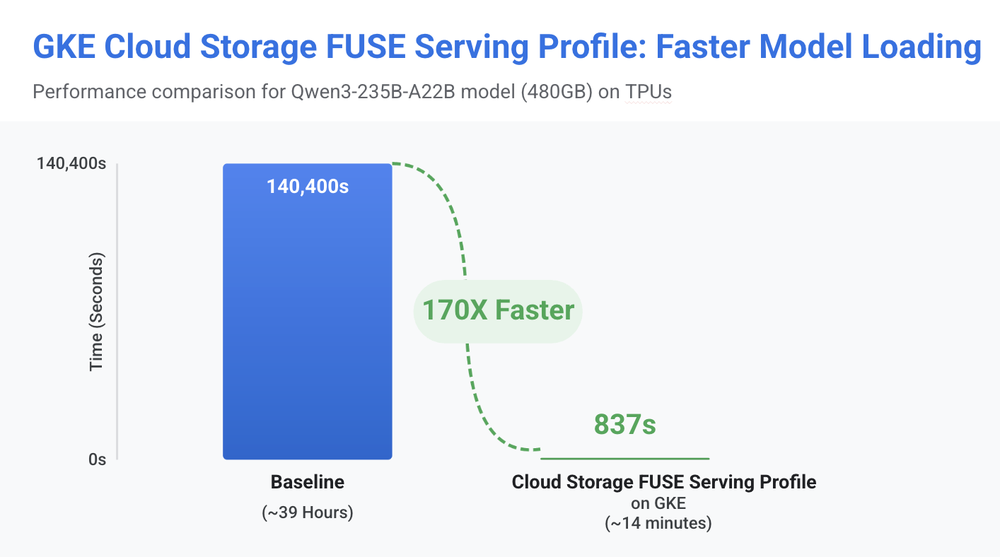
Using GKE Cloud Storage FUSE Profiles inference profile, we were able to reduce model loading time for a Qwen3-235B-A22B workload on TPUs (480GB) from 39 hours to just 14 minutes, helping customers achieve the maximum benefit of Cloud Storage FUSE GCSFuse out-of-the-box.
How to use Cloud Storage FUSE Profiles on GKE
To get started, ensure your cluster is running GKE version 1.35.1-gke.1616000 or later with the Cloud Storage FUSE CSI driver enabled.
1. Identify the StorageClass
GKE comes pre-installed with the profile-based StorageClasses. You can verify them with:
- code_block
- <ListValue: [StructValue([(‘code’, ‘kubectl get sc -l gke-gcsfuse/profile=true’), (‘language’, ”), (‘caption’, <wagtail.rich_text.RichText object at 0x7f717c265f70>)])]>
2. Create your PV and PVC
When creating your PersistentVolume, point it to your Cloud Storage bucket. GKE automatically initiates a bucket scan to determine the optimal configuration.
- code_block
- <ListValue: [StructValue([(‘code’, ‘apiVersion: v1rnkind: PersistentVolumernmetadata:rn name: gcs-pvrnspec:rn accessModes:rn – ReadWriteManyrn capacity:rn storage: 5Girn persistentVolumeReclaimPolicy: Retain rn storageClassName: gcsfusecsi-trainingrn mountOptions:rn – only-dir=my-ml-dataset-subdirectory # Optionalrn csi:rn driver: gcsfuse.csi.storage.gke.iorn volumeHandle: my-ml-dataset-bucketrn—rnapiVersion: v1rnkind: PersistentVolumeClaimrnmetadata:rn name: gcs-pvcrnspec:rn accessModes:rn – ReadWriteManyrn resources:rn requests:rn storage: 5Girn storageClassName: gcsfusecsi-trainingrn volumeName: gcs-pv’), (‘language’, ”), (‘caption’, <wagtail.rich_text.RichText object at 0x7f717db78130>)])]>
3. Create your Deployment
Once your Persistent Volume Claim (PVC) is bound, simply consume it in your Deployment as you would any other volume. GKE mounts the volume with the precise settings your hardware and dataset require.
- code_block
- <ListValue: [StructValue([(‘code’, ‘apiVersion: apps/v1rnkind: Deploymentrnmetadata:rn name: my-deploymentrnspec:rn replicas: 3rn selector:rn matchLabels:rn app: my-apprn template:rn metadata:rn labels:rn app: my-apprn annotations:rn gke-gcsfuse/volumes: “true”rn spec:rn serviceAccountName: my-ksarn containers:rn – name: my-containerrn image: busyboxrn volumeMounts:rn – name: my-gcs-volumern mountPath: “/data”rn volumes:rn – name: my-gcs-volumern persistentVolumeClaim:rn claimName: gcs-pvc’), (‘language’, ”), (‘caption’, <wagtail.rich_text.RichText object at 0x7f717db78970>)])]>
After it’s deployed, the CSI driver automatically calculates optimal cache sizes and mount options based on your node’s resources, such as GPUs or TPUs, memory, Local SSD, the bucket or sub-directory size, and the sidecar resource limits.
Get started today
GKE Cloud Storage FUSE Profiles remove the guesswork from configuring your cloud storage for high performance. By moving from manual “knob-turning” to automated, workload-aware profiles, you can spend less time debugging storage throughput and more time building the next generation of AI.
Ready to get started? GKE Cloud Storage FUSE Profiles are generally available in version 1.35.1-gke.1616000. Explore the official documentation to configure Cloud Storage FUSE profiles in GKE for your AI/ML workloads!