AlloyDB is an AI-native database—it isn’t just a passive data store, it intelligently understands and processes your data. With AlloyDB, you get industry-leading vector and hybrid search, near 100% accurate natural language-to-SQL capabilities to build conversational agents, tools to enable you to build with your agentic IDEs of choice, and the ability to bring the intelligence of foundation models like Gemini directly to your data through AI functions.
In this blog post, we discuss the massive breakthroughs in AI function processing alongside a suite of brand-new AI functions.
But first: what exactly are AI functions? They bring Gemini’s world knowledge to your AlloyDB data. Consider the challenge of managing raw user feedback: it’s unstructured, and difficult to parse through. Before this data can be leveraged for search, it may require pre-processing and entity extraction. Rather than maintaining complex custom pipelines for knowledge extraction, you can use Gemini’s generation capabilities directly within AlloyDB to transform raw text into structured, searchable insights. For example, here is how you can use ai.generate to instantly turn raw feedback into clean, structured JSON (see more examples here):
- code_block
- <ListValue: [StructValue([(‘code’, “SELECTrn log_id,rn raw_content,rn — Use Gemini 3.0 to reason through the raw user feedback and extract structurern ai.generate(rn model_id => ‘gemini-3.1-pro-preview’,rn prompt =>rn ‘Analyze this raw customer feedback entry. Extract the country, service name, and a 1-sentence summary of the feedback. Return as JSON.’rn || raw_content) AS structured_feedbackrnFROM raw_feedback_logsrnWHERE user_type <> ‘internal’;”), (‘language’, ”), (‘caption’, <wagtail.rich_text.RichText object at 0x7f6c5e0e7be0>)])]>
Here is a sample result:
More functions to summarize and analyze sentiment
Our core AI functions —ai.generate, ai.rank, ai.if, and ai.forecast—are now Generally Available. To learn more about use cases for the first three, refer to this blog post. To explore the forecast function in action, check out this deep dive.
Building on this momentum, we have introduced three brand new functions: ai.summarize, ai.agg_summarize, and ai.analyze_sentiment.
ai.analyze_sentiment: Automatically classifies the emotional tone of text as positive, negative, or neutral.ai.summarize: Condenses lengthy text into its most essential information while preserving the original tone and nuance.ai.agg_summarize: An aggregate tool that processes multiple rows within a column to generate a single, unified summary for an entire group (e.g., via aGROUP BYclause).
Here’s an example of how to use ai.agg_summarize to consolidate a product reviews for products on a retail website:
- code_block
- <ListValue: [StructValue([(‘code’, ‘SELECT productname, ai.agg_summarize(review) as reviews_summaryrnGROUP BY productname;’), (‘language’, ”), (‘caption’, <wagtail.rich_text.RichText object at 0x7f6c5e0e72b0>)])]>
Here is a sample result of summarized reviews for two gaming console products:
The power of LLMs on your data: now significantly faster and cheaper
We now have achieved unprecedented performance and cost breakthroughs in AI function processing. Previously, running a foundation model call for every single row in a massive database introduced cost and latency constraints. We have shattered these barriers by introducing two breakthrough capabilities:
Smart Batching for AI Functions: This AI Function Acceleration capability provides intelligent batching of AI function calls for optimal performance and quality. This efficiency is achieved by deduplicating prompt overhead; the LLM’s boilerplate instructions are transmitted once per batch rather than repeated across every individual row. A question you may have is – “Why not do this in my own application layer?”. That’s because, AlloyDB intelligently determines the right batch size for optimal results – if you underestimate the batch size, you won’t reap gains for cost and latency, and if you overestimate the batch size, the prompt to the LLM could get bloated and lead to hallucinations, or you could exceed the model’s token limits. In addition to calculating the perfect batch size for every request, AlloyDB also handles retries automatically out of the box, ensuring your pipeline stays resilient. We did some testing internally and saw massive gains; for example, an up to 2,400x performance boost (processing 10,000 rows/sec) over traditional row-at-a-time LLM calls. This is currently available for the ai.if and ai.rank functions, with support for additional functions coming in the future.
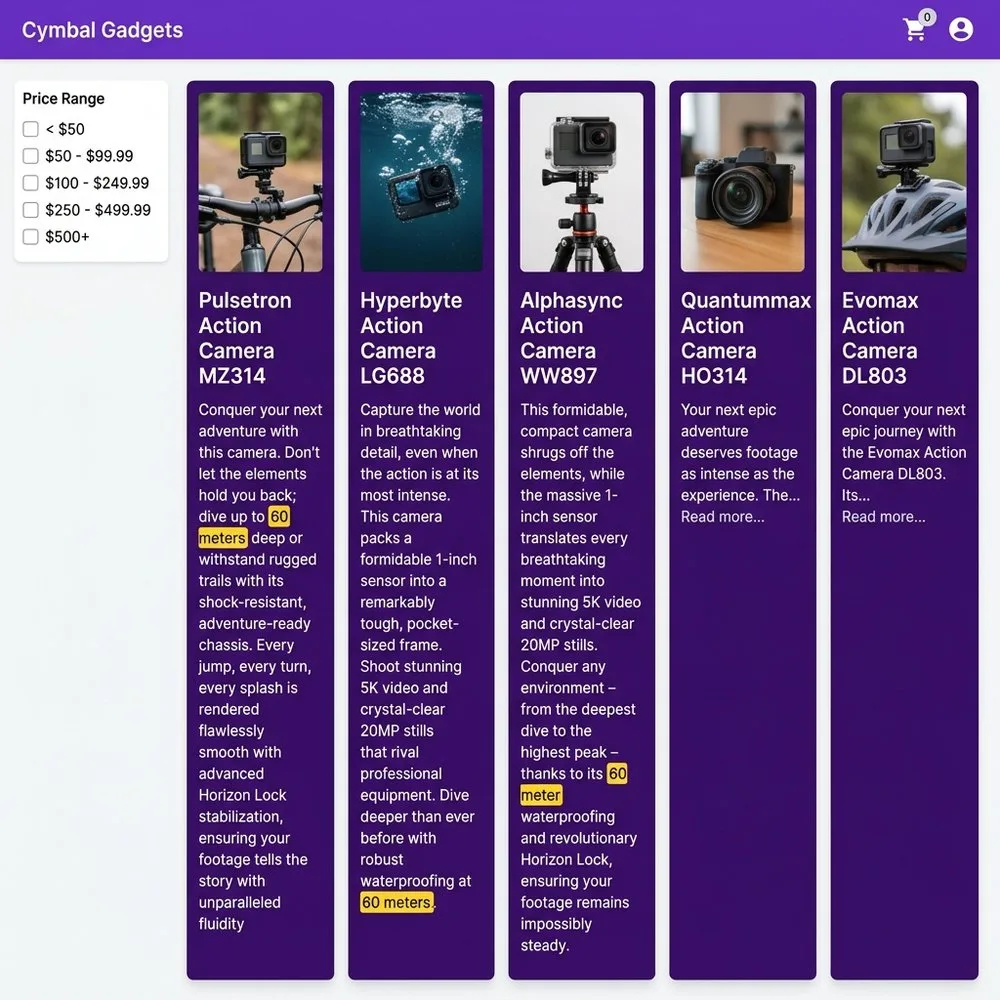
Let’s look at an example of using Smart Batching / Acceleration with ai.if to solve this use case: Imagine a customer on a gadget retail site searching for a camera that can handle an underwater depth of ’60 meters or deeper.’ Traditional hybrid search will pull the closest semantic and full-text matches, but it misses the hard constraints of numerical data—meaning it might serve up a camera that works only at 20 meters depth. By using AlloyDB’s ai.if-based intelligent filtering, the database actually understands the nuance of depth and makes the query return products that meet or exceed that 60-meter depth criteria. Notice how, in the example below, you don’t need to specify the batch size – AlloyDB handles all the optimizations under the hood when using ai.if.
- code_block
- <ListValue: [StructValue([(‘code’, “– Smart Batching / AI Function Acceleration rnSET google_ml_integration.enable_ai_function_acceleration = on;rnSELECT productid, productname, category,descriptionrnFROM products AS prnWHERErn ai.if(rn ‘Evaluate if the product description indicates that the product is waterproof at depth 60m or deeper. Description:’rn || description);”), (‘language’, ”), (‘caption’, <wagtail.rich_text.RichText object at 0x7f6c5e0e7e80>)])]>
Here is a sample result on a hypothetical gadgets site. Notice how the expanded descriptions of products really match the criteria of working at a depth of 60 meters:

Optimized AI Functions: For even greater efficiency, we’ve introduced an optimized mode, starting with ai.if. By deploying a small, proxy model that utilizes your embeddings and is trained on your specific LLM outputs, we can process decisions natively within the database. This drastically reduces the need to call the external LLM – and based on some of our internal tests, we saw staggering gains; for example, up to 100,000 rows processed per second (a 23,000x improvement) and costs slashed by 6,000x (down to 1/10th of a cent). For technical insights on this technique, including when it works best and when not, refer to this blog post. AlloyDB does the following when using optimized ai.if:
Trains a proxy model: AlloyDB trains a lightweight proxy model on a sample of your data. This happens in the background when you use the PREPARE statement with ai.if function to train the model for optimized queries.
Executes the query: When you use the EXECUTE statement, AlloyDB uses the trained proxy model to process the query locally.
Falls back to the LLM: If the accuracy of the model is low, or if AlloyDB can’t find a model, AlloyDB automatically falls back to using the LLM.
Let’s look at the same example of searching for a camera that can handle an underwater depth of 60 meters or deeper using optimized ai.if. Here we train a proxy model using the PREPARE statement and then EXECUTE the statement thereafter.
- code_block
- <ListValue: [StructValue([(‘code’, “– Prepare the Optimized Function / Proxy ModelrnPREPARE waterproof_camera_60m ASrnSELECT productid, productname, category, descriptionrnFROM products AS prnWHERErn ai.if(rn ‘Evaluate if the product description indicates that the product is waterproof at depth 60m or deeper. Description:’rn || description,rn description_embedding);rnrn– Run the Proxy ModelrnEXECUTE waterproof_camera_60m;”), (‘language’, ”), (‘caption’, <wagtail.rich_text.RichText object at 0x7f6c5e0e7760>)])]>
You see the same products that truly match the criteria of working at a depth of 60 meters – as shown in the screenshot above. Here’s a tabulated version for the first three products, so you can look at the descriptions more closely:
See it in action!
Watch how this all comes together in this demo video.
Getting started is easy
Ready to bring unprecedented speed and cost-efficiency to your AI workloads?
New to AlloyDB? Discover AlloyDB with a 30-day free trial.
AI functions quickstart: Enable a few quick prerequisites and start calling functions like ai.if, ai.generate, or ai.analyze_sentiment directly within your SQL queries. Check out these practical examples to begin.
Boost performance and optimize costs: To unlock the biggest performance and cost gains, follow our guide on optimized functions. This is available in preview for ai.if, and will be expanding to more functions soon. For technical insights on this technique, including when it works best and when not, refer to this blog post.
Scale your throughput: Use smart batching to accelerate AI functions (available in preview for ai.if and ai.rank) or array-based functions (generally available for all LLM-based AI functions) to handle bulk prompting smoothly.