About this Series
Frontend engineering at Palantir goes far beyond building standard web apps. Our engineers design interfaces for mission-critical decision-making, build operational applications that translate insight to action, and create systems that handle massive datasets — thinking not just about what the user needs, but what they need when the network is unreliable, the stakes are high, and the margin for error is zero.
This series pulls back the curtain on what that work really looks like: the technical problems we solve, the impact we have, and the approaches we take. Whether you’re just curious or exploring opportunities to join us, these posts offer an authentic look at life on our Frontend teams.
In this blog post, Raj, a frontend engineer based in CA, shares shares how rendering accurate circles on maps led him through map projections, spherical trigonometry, and the surprising complexity of visualizing ranges in polar regions. Stay tuned for Part 6.
Recently, we wrote about plotlines in Three.js — the lines, connections, and orbits we render on top of our 3D globe. But before we can actually draw anything, we need the globe itself to perform well, regardless of what area of the world you’re viewing.
Zodiac is our custom-built 3D globe library on top of Three.js. While building this, we kept running into the same pattern: the equator was smooth, mid-latitudes were fine, but pan toward the Arctic and everything slowed to a crawl. The poles were absolutely killing performance, and there was no obvious fix.
How Tiling Works
To first understand why this problem was happening, we need to start with how map tiles work.
When you pan around any interactive map on the internet, you’re not actually loading one giant image of the Earth. Instead, the map is divided into a grid of small square images called “tiles.” As you zoom in, each tile splits into four higher-resolution children. The standard approach divides the world into equal-sized rectangles in latitude/longitude space. At zoom level 0, you can have 1 tile covering the whole planet. At zoom 1, each tile splits into 4. At zoom 7, you have thousands.
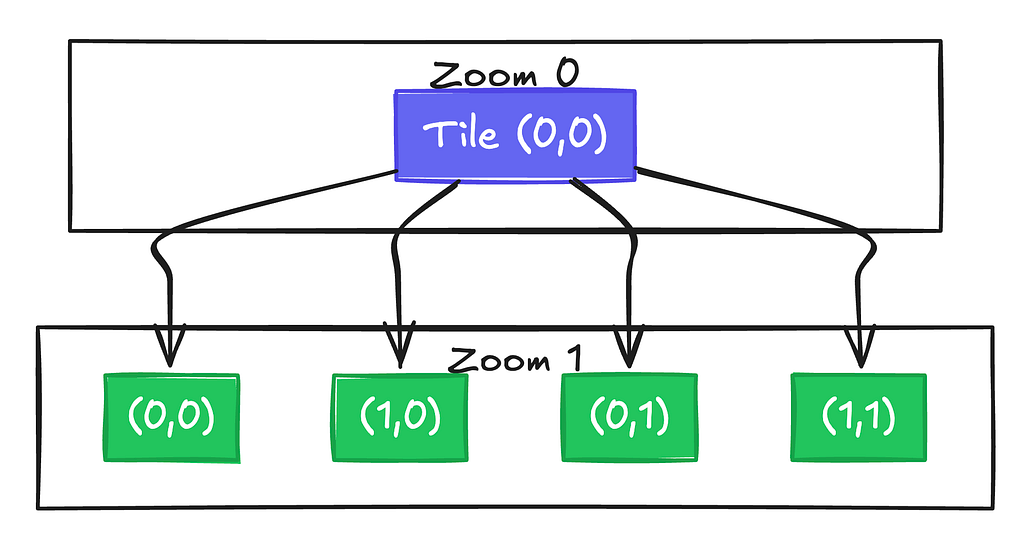
The benefits of this are for both visual clarity and performance. When fully zoomed out and trying to understand the broader context of a map, the street level data is just noise. However when we zoom in, we can load in these more detailed tiles once they become more relevant. This is also great for performance — we will only need to ever load in a couple dozen tiles based on the current viewport, and not the entire data of the map at all times.
The Poles Problem
The problem is that this tiling system was designed for flat maps. On a 2D Web Mercator projection, the polar regions get stretched horizontally, which conveniently means you always see roughly the same number of tiles no matter where you pan. Although Greenland may look as big as Africa on these maps, the tile count stays manageable.
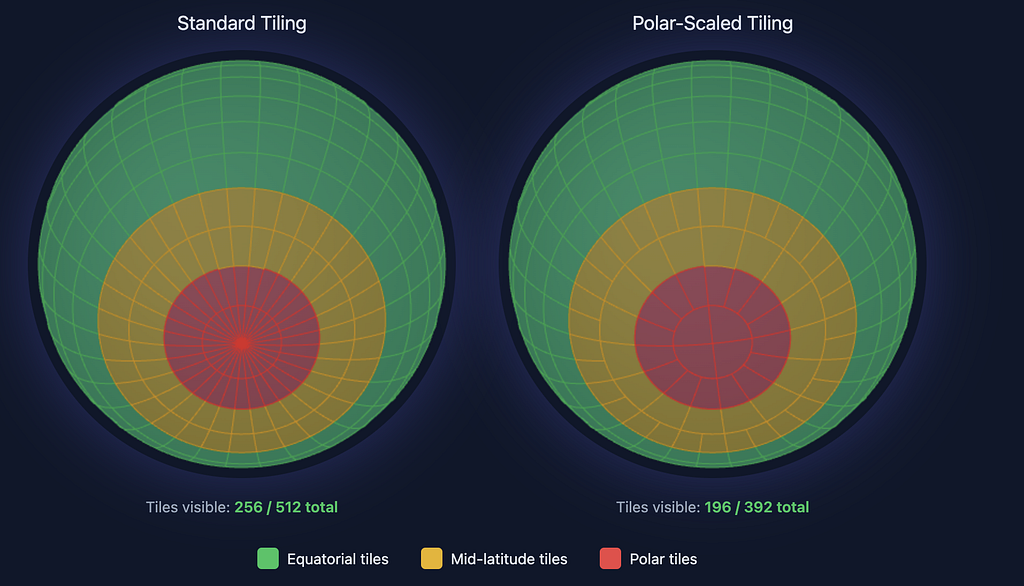
On a 3D sphere? No such luck. The poles become convergence points where all lines of longitude meet. Those equal-angular tiles become tiny slivers that all fight for the same few pixels, and require lots of geometries to be made to account for them.
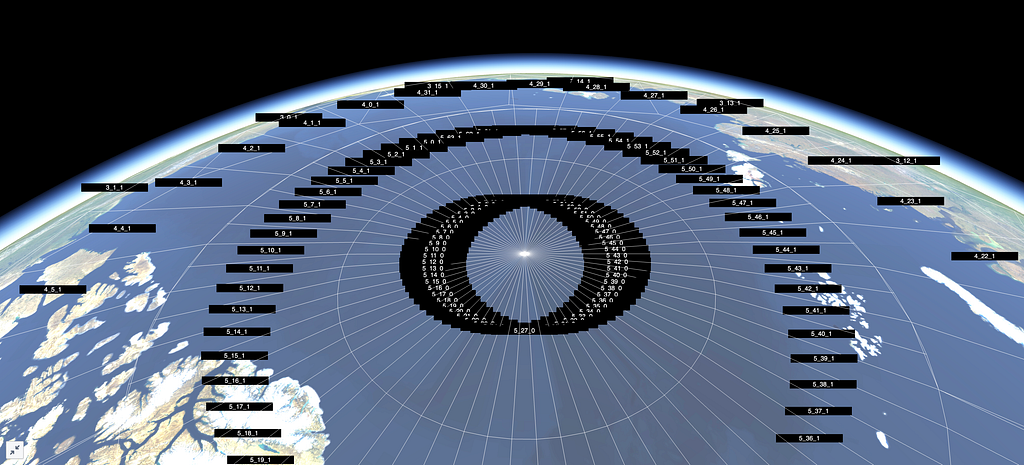
Zooming into the Arctic, our original implementation created a massive number of geometries and triangles — enough to tank the frame rate on most high end machines, and render it completely unusable on lighter weight ones.
The Fix: Think in Surface Area
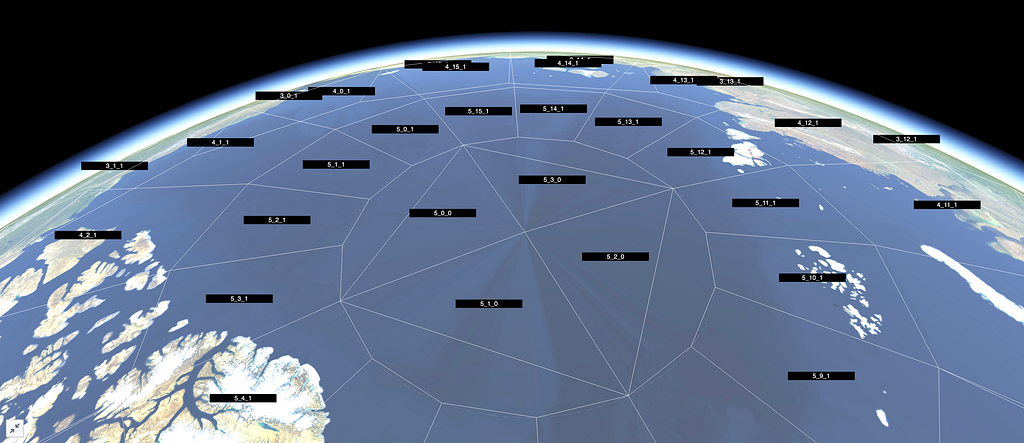
A 5.625° × 5.625° tile at the equator covers ~394,000 km². The same angular tile at 84°N? Only ~24,000 km² — about 6% the area. We’re creating 16× more geometry than we need. Instead of thinking in angular extent, we need Zodiac to think in surface area.
To do this, we decided on creating a new internal tiling format for Zodiac: polar scaled tiles. This will double the width of polar tiles until they’re roughly comparable in area to equatorial tiles. The key calculation uses the spherical surface area formula:
A = R² (sin φ₁ − sin φ₂) (θ₁ − θ₂)
Where R is Earth’s radius, φ represents latitude bounds in radians, and θ represents longitude bounds. This formula directly accounts for how surface area shrinks as you approach the poles.
This core function then determines how many standard tiles to merge:
function getSpanForZoomAndY(zoom: number, y: number): number {
  if (zoom === 0) {
    return 1;
  }

  const area = getUnscaledAreaForZoomAndY(zoom, y);
  const maxArea = maxTileAreaForZoom(zoom);
  const factor = maxArea / area;

  const log2Factor = Math.log2(factor);
  const roundedLog2 = Math.floor(nudgeFloat(log2Factor, Math.round(log2Factor)));
  return Math.pow(2, roundedLog2);
}
This function compares the area of a standard tile at a given latitude to the maximum tile area for that zoom level, which occurs at the equator. The ratio essentially tells us how many tiles to merge. By using Math.pow(2, roundedLog2), we ensure the span is always a power of 2, which keeps the math clean for applying textures to the 3D globe and smoothly transitioning between different levels of detail.
At zoom level 5, this means:
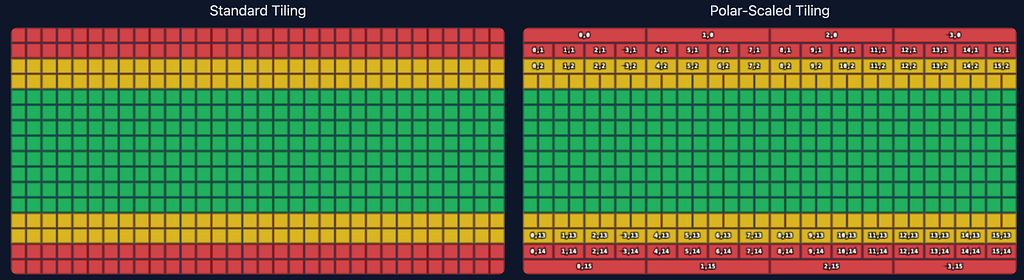
- North pole row (y=0): 4 tiles around the entire circumference (span of 16 standard tiles each)
- Mid-latitude (y=4): 32 tiles (span of 2 each)
- Near equator (y=15): 64 tiles (span of 1 — no merging needed)
Interestingly, no matter the zoom level, this guarantees exactly 4 tiles at the top and bottom rows near the poles. This is an example of what this tiling looks like at zoom level 4.
Breaking the Quadtree
Here’s where it gets interesting. The standard tile quadtree assumes every tile splits into exactly 4 children — it’s baked into basically every tiling implementation. Polar-scaled tiles break that assumption.
Because tiles at different latitudes have different widths, a parent tile near the pole might expand into 5 children instead of 4:
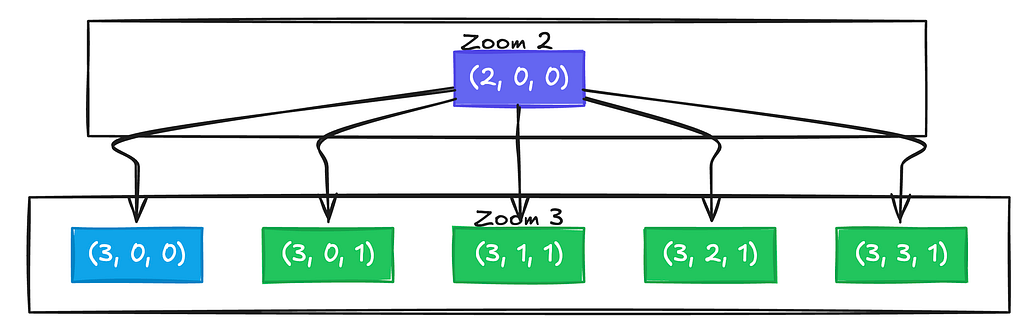
One child stays narrow near the pole, while four children appear in the row further south where more tiles are needed. The actual implementation calculates child counts dynamically:
export function zoomTile(tile: Tile, out: Tile[] = []): Tile[] {
  const { zoom, x, y } = tile;
  const topY = y * 2;
  const bottomY = topY + 1;

  const thisYTiles = getLongitudeTilesForZoomAndY(zoom, y);
  const nextTopYTiles = getLongitudeTilesForZoomAndY(zoom + 1, topY);
  const nextBottomYTiles = getLongitudeTilesForZoomAndY(zoom + 1, bottomY);

  const topFactor = Math.log2(nextTopYTiles / thisYTiles);
  const bottomFactor = Math.log2(nextBottomYTiles / thisYTiles);
  const topCount = Math.pow(2, topFactor);
  const bottomCount = Math.pow(2, bottomFactor);

  for (let i = 0; i < topCount; i++) {
    out.push({ zoom: zoom + 1, x: x * topCount + i, y: topY });
  }
  for (let i = 0; i < bottomCount; i++) {
    out.push({ zoom: zoom + 1, x: x * bottomCount + i, y: bottomY });
  }
  return out;
}
Each latitude row can have a different number of children. Looking at the northern hemisphere, the top row, closer to the pole, might split into fewer tiles than the bottom row, which is closer to the equator. This meant reworking our tile traversal, parent lookups, and level of detail selection.
Texture Stitching
Here’s the catch: tile servers don’t know about our polar scaling scheme — this is something very unique to Zodiac. They serve standard geodetic or Mercator tiles, and we can’t exactly ask them to change. So we have to do the compositing client-side.
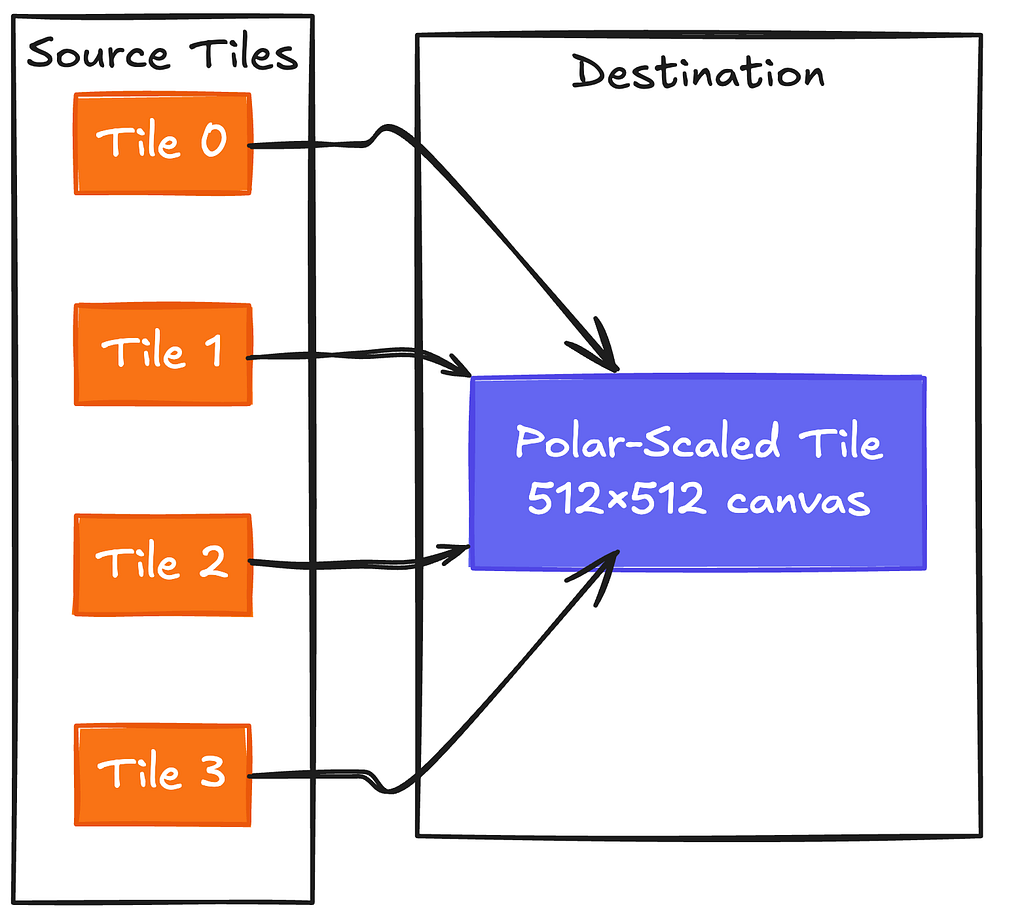
For a polar tile spanning 4 standard tiles, the texture loader:
- Calculates which source tiles intersect the polar tile’s bounds
- Fetches them all in parallel
- Creates a 512×512 canvas
- Draws each source image at its mapped pixel position
For geodetic source tiles, the coordinate mapping is just linear interpolation. But we also support Web Mercator source tiles, which requires more work: Mercator’s latitude scaling is nonlinear, so we divide each source tile into horizontal strips and map each strip separately. The strips account for how Mercator pixels near the top of a tile represent less latitude than pixels near the bottom.
Heightmaps
Zodiac supports terrain elevation visualization via “heightmaps,” which is a grid of elevation samples per tile that updates fixed points in a tile’s mesh. For polar-scaled tiles, we face the same stitching problem as above but with an additional twist: we need to resample the combined data back into a square grid that our tile geometry can use.
When a polar tile is wider horizontally, we load all the standard heightmap tiles that cover our wider bounds, combine them horizontally into a wide grid, and then resample back to square using bilinear interpolation:
private resampleToSquare(
  sourceData: Float32Array,
  sourceWidth: number,
  sourceHeight: number,
  targetSize: number
): Float32Array {
  const targetData = new Float32Array(targetSize * targetSize);

  for (let row = 0; row < targetSize; row++) {
    for (let col = 0; col < targetSize; col++) {
      const sourceRow = (row / (targetSize - 1)) * (sourceHeight - 1);
      const sourceCol = (col / (targetSize - 1)) * (sourceWidth - 1);

      // Bilinear interpolation
      const floorRow = Math.floor(sourceRow);
      const floorCol = Math.floor(sourceCol);
      const rowT = sourceRow - floorRow;
      const colT = sourceCol - floorCol;

      // ... fetch four neighboring samples and interpolate
      const interpolated = (1 - rowT) * ((1 - colT) * q11 + colT * q12)
                         + rowT * ((1 - colT) * q21 + colT * q22);

      targetData[row * targetSize + col] = interpolated;
    }
  }
  return targetData;
}
There’s also the question of what to do at the actual poles. Web Mercator (and lots of elevation datasets) only extends to about 85°N/S. Beyond that, we blend smoothly to fixed heights over a 5-degree transition zone: 0m at the North Pole, 2835m at the South Pole, which is roughly Antarctica’s average ice sheet elevation.
const NORTH_POLE_HEIGHT = 0;
const SOUTH_POLE_HEIGHT = 2835;
const POLAR_BLEND_ZONE = 5.0; // Blend over 5 degrees (80-85°)

private applyPolarBlending(latLng, loadedTiles): number | undefined {
  const latDegrees = deg(latLng.lat);

  if (Math.abs(latDegrees) >= WEB_MERCATOR_MAX_LAT) {
    return latDegrees >= WEB_MERCATOR_MAX_LAT ? NORTH_POLE_HEIGHT : SOUTH_POLE_HEIGHT;
  } else if (Math.abs(latDegrees) >= WEB_MERCATOR_MAX_LAT - POLAR_BLEND_ZONE) {
    const blendFactor = (Math.abs(latDegrees) - (WEB_MERCATOR_MAX_LAT - POLAR_BLEND_ZONE))
                      / POLAR_BLEND_ZONE;
    const polarHeight = latDegrees > 0 ? NORTH_POLE_HEIGHT : SOUTH_POLE_HEIGHT;

    // Get elevation from data, blend toward polar height
    const elevationHeight = /* ... fetch from loaded tiles ... */;
    return elevationHeight * (1.0 - blendFactor) + polarHeight * blendFactor;
  }

  return undefined; // No polar blending needed
}
Results
With polar-scaled tiles, the geometry count at the poles drops dramatically — over 90% fewer triangles, draw calls, and textures. More importantly, frame time is now a lot more consistent across the entire globe. The Arctic no longer completely tanks your frame rate once the tiles load in.
What’s Next
This doesn’t fully solve polar rendering, with the new bottleneck being texture loading. A single polar tile at zoom level 5 requires fetching 16 source tiles before it can display anything. A more complete solution would have the tile server generate polar-scaled tiles natively, eliminating client-side stitching entirely. That requires coordination between Zodiac and the tile provider on a shared tiling scheme.
Regardless, the client-side approach delivers major GPU wins. The architecture refactoring also makes it easier to support additional tiling schemes in the future, since our texture loaders now work with arbitrary tile bounds rather than assuming a fixed grid. That flexibility will matter as we tackle other spherical rendering problems down the line.
If this sounds like the kind of project and impact you’re interested in, check out our open roles today: https://www.palantir.com/careers/open-positions/. Our most applicable frontend postings are the “Web Application Developer” roles. We’re also hiring for these two specific roles right now: Software Engineer — Core Interfaces (Palo Alto), and Software Engineer — Defense Applications (DC).

Frontend Engineering at Palantir: Polar Scaled Tiles in Zodiac was originally published in Palantir Blog on Medium, where people are continuing the conversation by highlighting and responding to this story.